The % operator is colloquially called the mod or remainder operator, and most people assume that its behavior is the same in all languages. I mean, 8%5==3 in pretty much any language with a C-style syntax, including Java. But what if you have -8%3? Or, -8%-3? Or let's get really funky and what -8.03%-1.88 will be.
So here are the rules.
Both Java and C/C++ follow the ISO/IEC 1539:1991 standard, which maintains that (a/b)*b + a%b==a.
Hence, the % functions much more like a remainder operator than a modulus operator in mathematics. In addition, the ISO/IEC 1539:1991 standard states that quotients always round toward 0 when there are negative numbers invovled, which is why we sometimes end up with negative remainders.
The only difference between C/C++ and Java is that the % operator in Java accepts floats as arguments, while the C/C++ operator only accepts ints.
Showing posts with label computing. Show all posts
Showing posts with label computing. Show all posts
Friday, June 18, 2010

Tuesday, March 10, 2009
Wolfram Sets the Timer, Will Blow Away Factual Search in May
Go take a look at Wolfram Alpha.

It's a "computational knowledge engine." Sounds impressive, doesn't it? It definitely has the potential to completely blow away any factual search engine that has come previously, of which the most prominent example may be Powerset.
The brains behind this, Stephen Wolfram, is an acclaimed computer scientist that has had many incredible creations already, including the heavily used software package Mathematica, which adds jaw-dropping features in every release, and the stunning if controversial book A New Kind of Science, so he definitely has the background and the resources to create a good factual search engine. In fact, Wolfram has frequently posited, both in A New Kind of Science, and other sources, that he believes computation can be a valid representation of knowledge and science. Hence, Wolfram Alpha is based on what VentureBeat describes well as "terabytes of curated data and millions of lines of algorithms" to create a representation of computable human knowledge.
While I can't say anything to the efficacy of this--it may blow all of us away come May, or it could be the next Cuil--it will definitely be a step forward in the problem of factual search. With Wolfram's entire focus behind this project, and with the concession that this is still a work in progress, I do hope that this will actually work much better than Powerset (which is not to say anything bad about Powerset--they were a little underwhelming, but technically, I can see the incredible technology and useful research that went into building it).
If anyone can get me early access to Wolfram Alpha, I would owe you a big one.

It's a "computational knowledge engine." Sounds impressive, doesn't it? It definitely has the potential to completely blow away any factual search engine that has come previously, of which the most prominent example may be Powerset.
The brains behind this, Stephen Wolfram, is an acclaimed computer scientist that has had many incredible creations already, including the heavily used software package Mathematica, which adds jaw-dropping features in every release, and the stunning if controversial book A New Kind of Science, so he definitely has the background and the resources to create a good factual search engine. In fact, Wolfram has frequently posited, both in A New Kind of Science, and other sources, that he believes computation can be a valid representation of knowledge and science. Hence, Wolfram Alpha is based on what VentureBeat describes well as "terabytes of curated data and millions of lines of algorithms" to create a representation of computable human knowledge.
While I can't say anything to the efficacy of this--it may blow all of us away come May, or it could be the next Cuil--it will definitely be a step forward in the problem of factual search. With Wolfram's entire focus behind this project, and with the concession that this is still a work in progress, I do hope that this will actually work much better than Powerset (which is not to say anything bad about Powerset--they were a little underwhelming, but technically, I can see the incredible technology and useful research that went into building it).
If anyone can get me early access to Wolfram Alpha, I would owe you a big one.
Wednesday, November 26, 2008
Hi! I'm Windows Updater! I'm Annoying!
"Hi! Do you want to update your computer? No? Well, that's no problem! I'll just remind you in 5 minutes! [. . .]Now do you want to update? No? Well I'm a considerate fellow! I'll just remind you in 5 minutes! [. . .]How about now? No? Oh, I think I finally understand you clearly now! I'll just remind you in 5 minutes! [. . .]It's been 5 minutes! What about now? Hello? Anyone there? Well, I've waited patiently for a minute, and you stood me up, but I'll still be nice to you and put all your programs and windows away and restart your computer for you!"

Don't let Windows Automatic Updater ever bother you again. Here are two solutions, both assuming the fact that you still want your computer to be updated.
1. Modifying the Automatic Updates Service
When that restart message starts nagging you, go to your Control Panel-->Administrative Tools-->Services. Then, right click on the "Automatic Updates" row and click "Stop." Now you are free to restart at your own discretion. Note that the Automatic Updates will turn on again when you restart your computer, allowing for future updates.
2. ShutdownGuard
This is my preferred method. ShutdownGuard is an open-source software that lives on your tray and will intercept Automatic Updater's pop-ups, and display a bubble from your tray. You can customize the display options and various other settings to your liking. Thank Lifehacker for bringing this to my attention.
Now if only we can do the same with Adobe Updater, Apple Updater, etc...
Saturday, November 22, 2008
Minority Report Comes to Life
A clip from Minority Report? No. It's real.
g-speak overview 1828121108 from john underkoffler on Vimeo.
g-speak overview 1828121108 from john underkoffler on Vimeo.
Oblong is apparently the company that advised the production staff of Minority Report on the technology of the film, with much of their expertise derived from the founders' research at the MIT Media Lab. Oblong promises to "fundamentally chnage the way people use machines at work, in the living room, in conference rooms, in vehicles."
Friday, June 27, 2008
Keyboard Shortcutting
If you're on your computer or online a few hours each day, and you go to a wide variety of web sites, or use lots of different programs, you have probably realized that using the mouse is a slow endeavor, and that keyboard shortcuts rock.
Here are two that rock the hardest, in my opinion.
1. Launchy (http://www.launchy.net)

Launchy is a text launcher that will revolutionize the way you use your computer. After installing, just press Alt-Space to pop up the launcher, and start typing the name of the program you want to launch, or even non-continuous letters of the program you would like to launch. Then, select from the list using the arrow keys the one that matches. Launchy quickly learns the programs you launch the most, so after a day or two, you'll be amazing everyone with your program-launching skills.
2. Firefox keywords
What if you can search something on google by typing "g something" on your web browser? Or search Wikipedia by typing "wp something"? Or UrbanDictionary, or YouTube search, or hundreds of other possibilities? Well, here's a quick guide on how to set those address bar searches up in Firefox.
A. Go the the page with the search box. I used Wikipedia below as an example. Then, right click in the search field, and click "Add a Keyword for this Search..."
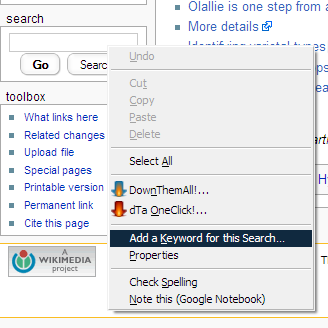
B.
The following dialog should pop up:
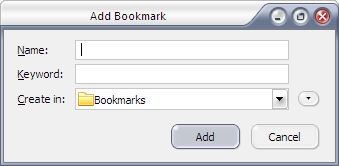
C.
Type in a name for your bookmark, and a short, easy to remember keyword with which you can use your search. In my Wikipedia example, I used "wp".
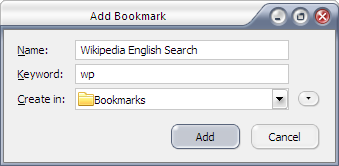
D.
Then, in the address bar, just type "[your keyword] [your search]" and you're good to go! (Hint: to quickly go the the address bar, just press F6!)


Here are two that rock the hardest, in my opinion.
1. Launchy (http://www.launchy.net)

Launchy is a text launcher that will revolutionize the way you use your computer. After installing, just press Alt-Space to pop up the launcher, and start typing the name of the program you want to launch, or even non-continuous letters of the program you would like to launch. Then, select from the list using the arrow keys the one that matches. Launchy quickly learns the programs you launch the most, so after a day or two, you'll be amazing everyone with your program-launching skills.
2. Firefox keywords
What if you can search something on google by typing "g something" on your web browser? Or search Wikipedia by typing "wp something"? Or UrbanDictionary, or YouTube search, or hundreds of other possibilities? Well, here's a quick guide on how to set those address bar searches up in Firefox.
A. Go the the page with the search box. I used Wikipedia below as an example. Then, right click in the search field, and click "Add a Keyword for this Search..."

B.
The following dialog should pop up:

C.
Type in a name for your bookmark, and a short, easy to remember keyword with which you can use your search. In my Wikipedia example, I used "wp".

D.
Then, in the address bar, just type "[your keyword] [your search]" and you're good to go! (Hint: to quickly go the the address bar, just press F6!)

Friday, June 6, 2008
The RIAA is Suing My Printer

There is an interesting study out by the University of Washington's Computer Science department revealing flaws in the detection of copyright infringers online. In the study, it was found that enforcement agencies sometimes used merely the fact that an IP address was seen in connection with a certain file online in implicating a user, without verification that the owner of the IP address did actually download anything, or that the owner of the IP is even a person. With IP spoofing tactics, they managed, hilariously, to get three printers in the CS department to receive DMCA takedown complaints from the MPAA. Is this result likely to get noticed in the next wave of countersuits against the RIAA and MPAA? Probably. Are universities going to change their policies because of this? No comment.
See the official page for the paper, an FAQ, and more details.
(Image courtesy of the Washington University CS Department.)
Sunday, May 11, 2008
Apple, eBay, Amazon at Bottom of Climate Scorecard
One of my new favorite blogs, Earth2Tech, has just posted on ClimateCounts' release of the latest Climate Scorecard, scoring companies on their efforts at informing and taking action on climate change. Not sure exactly how accurate this is, as Dell is surprisingly low on the list, considering its now industry-standard recycling program and efforts at creating more eco-friendly laptops and servers. This is similar to the well-known "Guide to Greener Electronics" released by Greenpeace, which has a greater emphasis on the use and disposal of toxic materials and release of greenhouse gases in production.
Thursday, May 8, 2008
Play Video Games. Beat Molecular Biologists. Feel Good.
Harnessing the millions of easily distractable minds worldwide, groundbreaking science is being done. Rosetta@Home, the software that is modeled after Stanford's Folding@Home and designed for distributed calculation and prediction for 3D protein shapes on millions of computers worldwide, now has a new feature. As the Economist article describes, the new Rosetta@Home software contains a game in which users (players) can manipulate the 3D protein structure according to basic laws of chemistry and physics in order to minimize energy. This was created due to the fact that 3D protein alignments and folding are still hugely computationally intensive, and often, the best 3D structures are found by molecular biologists working by hand rather than a computer using a heuristic algorithm. Moreover, humans often find these optimal structures faster than would the Rosetta@Home distributed computing network. There are some friendly competitions going on already.
Friday, April 25, 2008
Making Hardy Heron Even Hardier
Thie great article from Lifehacker details how to ease the transition into the newest distribution of Ubuntu, especially if you're giving up Windows or Mac OSX for the first time, and are wondering how you can do all the stuff you used to.
And of course, Ubuntu Hardy Heron is a Longterm Support Release (LTS), so you will be able to get online support for it for at least the next three years if you have the desktop version, and at least the next five years if you have the server version.
And of course, Ubuntu Hardy Heron is a Longterm Support Release (LTS), so you will be able to get online support for it for at least the next three years if you have the desktop version, and at least the next five years if you have the server version.
Subscribe to:
Posts (Atom)

 Posts
Posts


